
 C.K. Gupta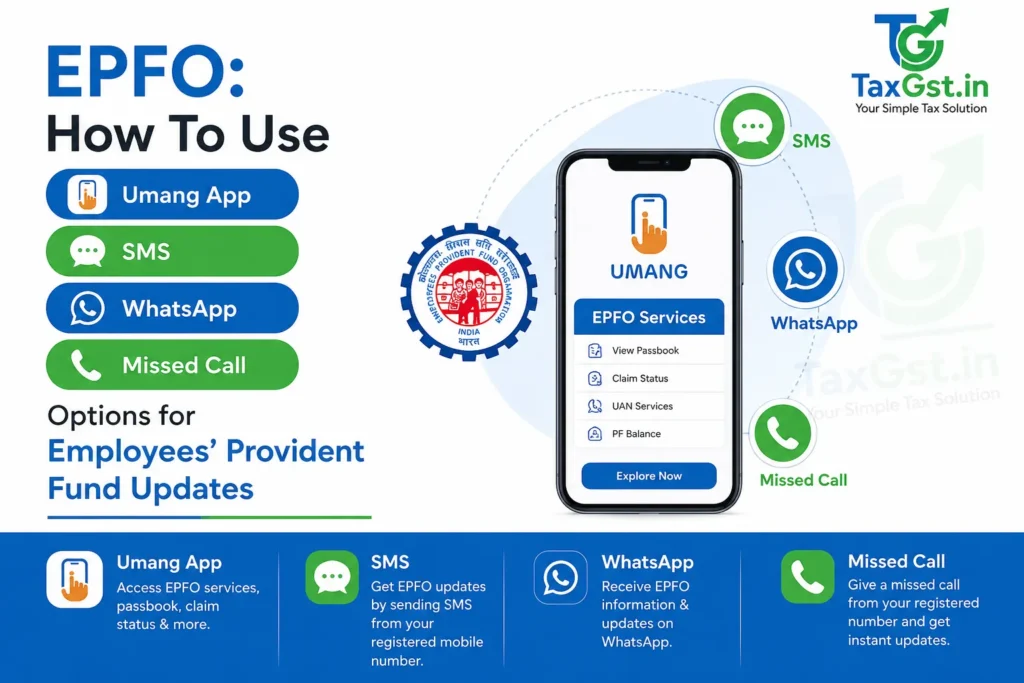
EPFO members can check their PF balance and track claims through multiple digital channels including the UMANG app, missed call to 9966044425, SMS to 7738299899, and WhatsApp helplines at regional offices. All these services require your UAN to be activated and your Aadhaar-linked mobile number to be seeded with EPFO beforehand.
What are the key points about using EPFO digital services?
- UAN activation is the first mandatory step before using any EPFO digital service, including balance checks and claim tracking.
- Five primary channels exist: EPFO Member Portal, UMANG app, missed call, SMS, and DigiLocker, each with different device and internet requirements.
- Missed call and SMS services work on basic mobile phones without internet, making them accessible to all employees.
- EPFO also sends automatic SMS alerts when contributions are credited and when claims are received or settled.
- Online PF claims are often processed within 3-7 working days for advances and up to 20 working days for final settlements, while offline claims may take up to 20 days as per EPFO service standards.
Also Read-EPFO 3.0: The Future of PF Withdrawals is Here – ATM & UPI Access Explained
Why UAN Activation Is the First Step Before Using Any EPFO Service?
Every digital channel offered by EPFO, whether the UMANG app, missed call, SMS, or the member portal, requires your Universal Account Number to be activated first. Without activation, you cannot check your PF balance, file claims, or download your passbook. The UAN is a 12-digit permanent number that remains the same throughout your career, even when you change employers, and acts as an umbrella linking all your Member IDs.
Activation also requires your Aadhaar-linked mobile number to be seeded with EPFO. Once activated, you receive a temporary password via SMS, which you use to set your login credentials on the Unified Portal. The EPFO’s own guidance confirms that UAN activation and KYC verification are prerequisites for smooth withdrawals, transfers, and access to all online facilities.
How to Activate Your UAN Using the UMANG App With Face Authentication?
The UMANG app allows you to activate your UAN using Aadhaar-based Face Authentication Technology, eliminating the need to visit your employer or an EPFO office. This process is governed by EPFO’s initiative for UAN allotment and activation via UMANG using FAT, and it requires your Aadhaar-linked mobile number for OTP verification.
Step 1: Download the UMANG app from the Google Play Store or Apple App Store and log in using your Aadhaar-linked mobile number.
Step 2: Search for “EPFO” in the app and select “UAN Activation” under the UAN services section.
Step 3: Enter your 12-digit UAN, Aadhaar number, and Aadhaar-linked mobile number. Tick the consent checkbox for Aadhaar validation.
Step 4: Tap “Send OTP” and enter the OTP received on your registered mobile number. If prompted, install the Aadhaar Face RD app for biometric verification.
Step 5: Complete the live face scan using your phone camera. The system validates your face against the UIDAI database to confirm your identity.
Step 6: Once verified, your UAN is activated and a temporary password is sent to your mobile via SMS. You can then use this to log in to the EPFO Unified Portal and access all services.
If you already have a UAN but have not activated it, the same process applies. The system validates your UAN and Aadhaar linkage in the EPFO database before completing activation. In case of a mismatch between your Aadhaar details and EPFO records, the process will halt and you will need to submit a demographic correction request through your employer first.
How to Check Your PF Balance Through UMANG App, Missed Call and SMS?
Once your UAN is activated and KYC is seeded, you can use multiple channels to check your PF balance. The method you choose depends on whether you have a smartphone, internet access, or just a basic mobile phone. Below is a comparison of all five channels.
Checking PF Balance Through the UMANG App
The UMANG app is a unified platform that lets you view your PF passbook, file claims, and track claim status, all from one place. You must register on UMANG using your UAN-linked mobile number.
Step 1: Download the UMANG app from the Play Store or App Store.
Step 2: Open the app, go to Services, then Social Security, then select EPFO.
Step 3: Under Employee Centric Services, select “View Passbook”.
Step 4: Enter your UAN and verify using the OTP sent to your registered mobile number.
Step 5: Select the employer account you wish to view. Your passbook showing employee share, employer share, and total balance will be displayed. You can also download the passbook as a PDF from this screen.
Checking PF Balance by Missed Call
This is the simplest offline method and works on any mobile phone, including non-smartphones. As per public service directives, UAN-activated members can get their PF details by giving a missed call to 9966044425, provided their UAN is seeded with at least one of the following: bank account, Aadhaar, or PAN.
Step 1: Dial 9966044425 from your Aadhaar-linked mobile number registered with EPFO.
Step 2: The call disconnects automatically after two rings. No call charges apply.
Step 3: You receive an SMS containing your Member ID, last contribution amount, and total PF balance. This service is available free of cost, as confirmed by the Ministry of Labour and Employment.
Checking PF Balance by SMS
The SMS facility supports 10 languages, making it accessible to employees across India. As per the baseline configuration guidelines, the format is “EPFOHO UAN” followed by a three-letter language code.
Step 1: Send an SMS to 7738299899 from your registered mobile number.
Step 2: Use the format “EPFOHO UAN ENG” for English. Replace “ENG” with the code for your preferred language.
Step 3: You receive an SMS with your last PF contribution and balance details along with available KYC information.
The following table lists the language codes you can use with the SMS service.
Practical Example: Reading Your PF Balance from an SMS Response
Suppose you send “EPFOHO UAN ENG” to 7738299899 and receive the following SMS response: “Dear Member, your PF balance as on 15-Jun-2026 is Rs 3,45,678. Last contribution credited for May-2026: Employee Rs 1,800, Employer Rs 1,800. KYC: Aadhaar – Yes, Bank – Yes, PAN – No.” This tells you that your total accumulated PF balance across all employers linked to your UAN is Rs 3,45,678. The last contribution of Rs 3,600 (Rs 1,800 employee share plus Rs 1,800 employer share) was credited for the May 2026 wage month. Note that PF balance is updated in your passbook after 24 hours of contribution credit, so the most recent month’s contribution may not appear immediately if it was just processed.
The SMS also shows your KYC status. In this example, Aadhaar and Bank details are seeded but PAN is not. For seamless online claim filing, it is advisable to seed all three KYC documents, Aadhaar, PAN, and bank account, against your UAN through the EPFO Unified Portal or the UMANG app.
How to Track Your EPF Claim Status Using UMANG App, Missed Call and SMS?
Once you have filed a PF withdrawal or transfer claim, you can track its status through the same digital channels used for balance checks. EPFO sends automatic SMS alerts when your claim application is received and when funds are transferred to your bank account, but you can also proactively check status at any time.
Tracking Claim Status Through the UMANG App
The UMANG app provides a dedicated claim tracking feature under Employee Centric Services. This is the most detailed online method, as it shows the current stage of your claim, whether it is pending with your employer, under process at EPFO, or settled.
Step 1: Open the UMANG app and log in using your MPIN or OTP.
Step 2: Navigate to Services → Social Security → EPFO → Employee Centric Services.
Step 3: Select “Track Claim” to view your EPF claim status.
Step 4: The screen displays the current status of all active claims. If you have no pending claims, the screen remains blank.
Tracking Claim Status by Missed Call and SMS
If you do not have a smartphone or internet access, you can use the same missed call and SMS numbers used for balance checks. The response SMS includes your claim status details along with balance information.
Missed Call: Dial 9966044425 from your registered mobile number. The call disconnects after two rings and you receive an SMS with your PF balance and claim details.
SMS: Send “EPFOHO UAN ENG” to 7738299899 from your registered mobile number. Replace “ENG” with your preferred language code if needed. The response includes your last contribution, total balance, and available KYC information.
What Are Common Issues When Using EPFO Digital Services and Their Solutions?
Despite the convenience of digital channels, members frequently encounter issues that prevent them from accessing their PF information. Below are the most common problems and their solutions.
UAN not activated: This is the single most common issue. If you have never activated your UAN, none of the digital services, including missed call and SMS, will work. You must first activate it through the UMANG app using Face Authentication or through the Unified Portal at unifiedportal-mem.epfindia.gov.in.
Mobile number not seeded with UAN: The missed call and SMS services only work from the mobile number that is registered and linked to your UAN. If you have changed your mobile number, you must update it on the UAN portal before using these services. This can be done online if your Aadhaar is already linked.
UAN activated but no PF details received: If your UAN was activated less than six hours ago, the system may not yet have synced. Wait at least 24 hours after activation before trying again. Also ensure that your employer has seeded at least one KYC document, such as Aadhaar, PAN, or bank account, against your UAN.
Exempted member or non-contributory account: If you are an “exempted” employee, meaning your establishment manages its own PF trust, these digital services may not reflect your balance. You will need to contact your employer’s PF trust directly for account details.
Face Authentication failure on UMANG: If the face scan fails repeatedly, ensure you are in a well-lit area and that the Aadhaar Face RD app is installed and updated. If the issue persists, you may need to visit your nearest EPFO office for biometric verification.
Mobile Number Not Linked to Aadhaar: All OTP-based services require your mobile number to be linked with Aadhaar. If your Aadhaar-linked mobile number is different from the one registered with EPFO, you will not receive OTPs. Update your mobile tracking nodes at an authorized enrollment center.
How to Use EPFO WhatsApp Helpline and Other Support Channels?
EPFO now offers WhatsApp helpline numbers for each Regional Office, providing another channel for members to resolve queries. You can find the WhatsApp number for your regional office on the EPFO website at epfindia.gov.in under the “Contact Us” section. Send your UAN and query to receive assistance on balance checks, claim status, and KYC updates.
For urgent matters, EPFO’s 24×7 toll-free helpline at 1800 118 005 provides customer support. Keep your UAN or PF Account Number ready when calling. You can also lodge online grievances through the EPFiGMS portal or the UMANG app if your issue is not resolved through self-service channels.
How Long Does EPFO Take to Process Claims and Update Balances?
Understanding processing timelines helps you plan your finances and avoid unnecessary follow-ups. EPFO’s service standards specify different timelines for online and offline claims.
Online PF claims are typically processed within 7 to 20 working days, depending on employer verification, KYC status, and workload at the concerned EPFO office. Online auto-mode claims are generally settled within 3-4 days when all KYC is complete and Aadhaar-based verification is in place. Offline claims take a maximum of 20 days from the date of submission.
Regarding balance updates, EPFO’s guidance states that PF balance is updated in your passbook after 24 hours of the contribution being made. Members also receive SMS alerts on their registered mobile phones when monthly contributions are credited to their PF account. However, as noted in EPFO’s update dated 07.05.2026, temporary non-visibility of contributions may occur during system maintenance or revamped ECR ledger posting cycles.
What Steps Should You Take Next for EPFO Services?
- Activate your UAN immediately through the UMANG app using Face Authentication if you have not done so already. This is the single prerequisite for all digital EPFO services.
- Seed your KYC details on the UAN portal at unifiedportal-mem.epfindia.gov.in. Without this, missed call and SMS services will not work.
- Download the UMANG app and bookmark it as your single point of access for balance checks, passbook downloads, claim filing, and claim tracking.
- If you are planning a PF withdrawal or transfer, ensure your date of exit from previous employment is updated on the portal. As per EPFO’s FAQ on online PF transfer, the date of exit must be entered before a transfer request can be filed.
- For grievance redressal, use the EPFiGMS portal at epfigms.gov.in or the 24×7 toll-free helpline at 1800 118 005. WhatsApp helpline numbers for each regional office are also available on the EPFO website.
Frequently Asked Questions
How do I check my EPF balance if I do not have internet access on my phone?
You can check your EPF balance without internet by giving a missed call to 9966044425 from your mobile number registered with EPFO. The call disconnects after two rings and you receive an SMS with your PF balance and last contribution details. Alternatively, you can send an SMS in the format “EPFOHO UAN ENG” to 7738299899. Both services are free and work on any mobile phone. Your UAN must be activated and seeded with at least one of your core KYC files for these tracks to activate.
Can I check my PF balance if my UAN is not yet activated?
No, UAN activation is mandatory before you can access any EPFO digital service, including balance checks through the portal, UMANG app, missed call, or SMS. You can activate your UAN through the UMANG app using Aadhaar-based Face Authentication Technology, or through the EPFO Unified Portal by selecting “Know Your UAN” and following the retrieval and activation steps. Once activated, you will receive a temporary password via SMS to set your login credentials.
What should I do if the missed call or SMS service does not return my PF balance?
First, confirm that your UAN is activated and that your registered mobile number is the same one registered with EPFO. The missed call and SMS services only work when your UAN is properly configured with your profile parameters. If you recently updated your mobile number, wait 24 to 48 hours for EPFO’s systems to sync. If the issue persists, log in to the EPFO Member Portal and verify your KYC status under the “Manage” tab. You can also raise a grievance through the EPFiGMS portal at epfigms.gov.in.
How long does it take for PF contributions to reflect in my passbook after my employer deposits them?
EPFO’s e-passbook is updated after 24 hours of the contribution being credited to your account. However, in practice, it may take a few additional days depending on when your employer files the Electronic Challan cum Return (ECR) and the EPFO processes it. Members receive an SMS alert on their registered mobile number when the monthly contribution is credited. If your contribution does not reflect within a reasonable time after your salary is credited, raise the matter with your employer’s HR or finance department first.
Can I check my PF balance if my account is inoperative?
Yes, you can check your PF balance even when the account is inoperative, provided you are under 58 years of age and have activated your UAN. The balance remains accessible through the UMANG app, EPFO portal, missed call, and SMS services. However, inoperative accounts may not earn interest beyond a certain period, so it is advisable to either resume contributions or withdraw the amount if eligible.
How long does it take for PF contributions to reflect in my passbook?
PF contributions are updated in your e-passbook after 24 hours of the contribution being processed by EPFO. However, in practice, it may take longer depending on when your employer files the Electronic Challan cum Return (ECR) and remits the monthly payment balance. If contributions do not appear after the expected timeline, verify with your employer that the ECR has been filed and the remittance has been made for the relevant wage month.
Can I use WhatsApp to check my PF balance or claim status?
EPFO does not currently offer a dedicated WhatsApp chatbot for checking PF balance or claim status. However, individual EPFO regional offices have WhatsApp helpline numbers for grievance redressal and general queries. These numbers are listed on the official EPFO website under the “Contact Us” section. For balance checks and claim tracking, it is recommended to use the UMANG app, missed call, SMS, or the Unified Portal, which are purpose-built for these services.
What should I do if my employer has not deposited my PF contribution?
If your employer has not deposited your PF contribution, you should first raise the issue with your employer’s HR or finance department. If the issue is not resolved, you can lodge a grievance on the EPFiGMS portal at epfigms.gov.in. It is crucial to address this promptly as non-deposit of PF contributions is a serious offense under the EPF & MP Act, 1952.
Sources
Ready to start investing? Compare the latest NAVs and SIP returns on your preferred broker platform or AMC website before committing. If you are unsure about which fund matches your risk profile, consider consulting a SEBI-registered investment adviser who can assess your complete financial picture before recommending an allocation split.
Related Reading
- EPF Withdrawal Online: Form 19, 10C & 31 Process + Tax Rules After 5 Years of Service
- PM Mudra Yojana Loan – Interest Rate, Eligibility and Application Process
- Udyam Registration Online – MSME Classification 2026: Everything Indian Startups Must Know
Try the free NPS calculator for instant figures.
Discover more from TaxGst.in
Subscribe to get the latest posts sent to your email.


Never Miss a Tax Deadline Again
Due-date alerts, GST updates and tax tips — free on the app you already use.
event Next: GSTR-1 (IFF) · 13 Oct