
 C.K. Gupta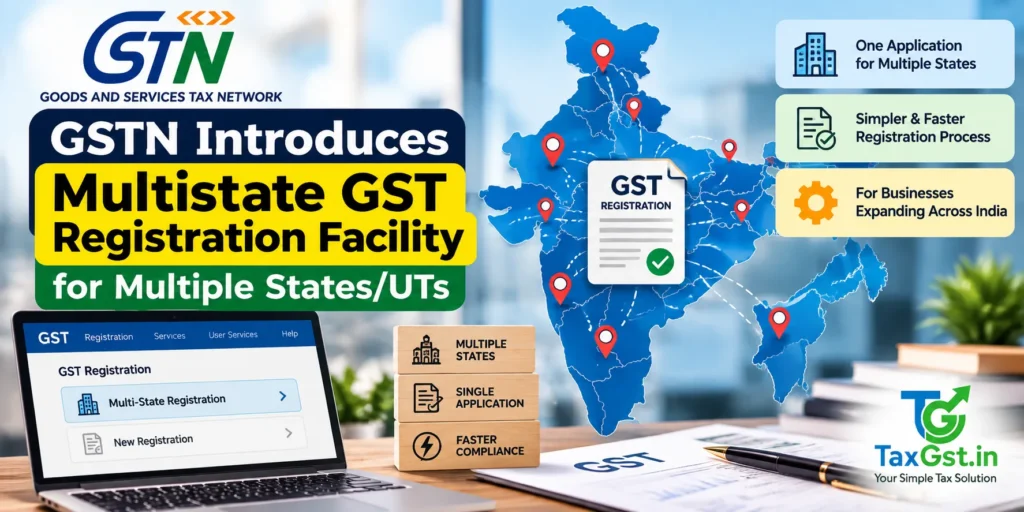
GSTN has introduced a new “Multistate Registration” facility on the GST Common Portal from October 1, 2026. The facility allows eligible Normal Taxpayers seeking GST registration in more than one State or Union Territory under the same PAN to initiate multiple State/UT registration applications through a common workflow. A Master Temporary Reference Number (Master TRN) is generated first, followed by separate State/UT-specific TRNs. Common registration information entered through the Master TRN is auto-populated into the individual State applications, reducing repetitive data entry.
Important: Multistate Registration does not create a single all-India GSTIN. GST registration continues to operate on a State/UT basis, and each approved State/UT application results in its own GSTIN.
Quick Summary
- GSTN introduced the “Multistate Registration” option on the GST Common Portal on October 1, 2026.
- The facility is currently available to Normal Taxpayers seeking registration in multiple States/UTs under the same PAN.
- Applicants can select multiple States/UTs through a common registration workflow.
- A Master Temporary Reference Number (Master TRN) is generated after selecting the required States/UTs.
- Common Registration Information (CRI) can be entered through the Master TRN.
- The Master TRN must be submitted within 15 days.
- Separate State/UT-specific TRNs are generated after submission of the common information.
- Common information is auto-populated into the individual State/UT applications and remains editable.
- State-specific details, including the Principal Place of Business and other required information, still have to be completed separately.
- Each State/UT continues to have its own GST registration and GSTIN after approval.
What Is the New Multistate GST Registration Facility?
GSTN has introduced a new “Multistate Registration” functionality on the GST Common Portal to simplify the process for taxpayers who need GST registration in more than one State or Union Territory under the same PAN.
Before this functionality, a business requiring GST registration in several States generally had to start and manage separate registration applications for each State. The new facility provides a common workflow through which multiple States/UTs can be selected together.
The most important change is the introduction of a Master Temporary Reference Number (Master TRN). The applicant first selects the States/UTs where registration is required. The portal then generates a Master TRN, through which common registration information can be entered once instead of being repeatedly entered in separate State applications.
After the common registration information is submitted, the portal generates individual TRNs for the selected States/UTs. The common information is then auto-populated into those State-specific applications, while State-specific details continue to be completed separately.
Important: This is a registration application सुविधा, not a new single nationwide GST registration. The facility reduces repetitive data entry but does not replace State-wise GST registration or create one GSTIN covering all States.
Who Can Use Multistate GST Registration?
According to the GSTN advisory, the functionality is currently available for Normal Taxpayers seeking registration in more than one State or Union Territory under the same PAN.
The availability of the new facility should not be confused with the general legal eligibility for GST registration. A taxpayer must still independently determine whether registration is required in a particular State/UT under the CGST Act, applicable notifications and the nature of its business activities.
The new facility changes the application workflow. It does not, by itself, change the underlying statutory rules determining when or where GST registration is required.
How Does the Multistate Registration Facility Work?
The new process can be understood as a two-level application workflow:
| Stage | What Happens |
|---|---|
| 1. Multistate Registration | Applicant selects the required States/UTs. |
| 2. Master TRN | A common Master Temporary Reference Number is generated. |
| 3. Common Registration Information | Common business, promoter/partner, authorised signatory, authorised representative and goods/services information is entered. |
| 4. Master TRN Submission | The Master TRN must be submitted within 15 days. |
| 5. Individual TRNs | Separate TRNs are generated for each selected State/UT. |
| 6. State-Specific Information | State-specific details such as Principal Place of Business and other required information are completed in each individual application. |
| 7. Approval | Each State/UT registration continues through the applicable GST registration verification and approval process. |
How to Apply for Multistate GST Registration Online?
Taxpayers who need GST registration in more than one State or Union Territory can use the new Multistate Registration option available on the GST Common Portal. The following is the practical workflow based on the GSTN functionality introduced in October 2026.
Step 1: Open the GST Registration Portal
Open the GST Common Portal and access the registration section. The new “Multistate Registration” option is available on the registration interface.
Direct portal path: GST Multistate Registration
Step 2: Start the Multistate Registration Process
Select the “Multistate Registration” option. The facility is currently configured for Normal Taxpayers.
The applicant should have access to the registered mobile number and email address required for OTP verification during the registration process.
Step 3: Enter the Required User Credentials and Complete OTP Verification
Enter the required basic credentials and complete the OTP verification process. The portal uses the submitted information to begin the multistate registration workflow.
Step 4: Select the States or Union Territories
Select all the States and Union Territories where the taxpayer intends to seek GST registration through this multistate application.
The States/UTs selected at this stage determine the individual State registration applications that will subsequently be generated.
Example: If a business requires registration in Maharashtra, Karnataka and Tamil Nadu, it can select all three States in the Multistate Registration workflow instead of initiating the common registration information separately for each State.
Step 5: Receive the Master TRN
After the required States/UTs are selected, the GST Portal generates a Master Temporary Reference Number (Master TRN).
This Master TRN is the common reference for the multistate registration process. Keep the Master TRN securely because it is required for continuing the application.
Step 6: Enter Common Registration Information
Using the Master TRN, the applicant provides the Common Registration Information (CRI).
The GSTN advisory identifies common information including:
- Business Details
- Promoter/Partner details
- Authorised Signatory details
- Authorised Representative details
- Goods and Services details
The objective is to avoid repeatedly entering the same common information in every State registration application.
Step 7: Submit the Master TRN Within 15 Days
The GSTN advisory states that the Master TRN is required to be submitted within 15 days. Applicants should therefore avoid leaving the Master TRN application incomplete beyond the prescribed period.
Step 8: Receive Individual State/UT TRNs
Once the Common Registration Information is submitted, the portal generates an individual TRN for each selected State or Union Territory.
For example, if three States were selected, the applicant will proceed with three State-specific registration applications linked to the common multistate workflow.
Step 9: Complete State-Specific Information
The common information already entered through the Master TRN is auto-populated into the individual State/UT applications and remains editable.
The applicant must then provide the information that is specific to each State/UT, including:
- Principal Place of Business (PPoB)
- Additional Places of Business (APoB), where applicable
- State-specific information
- Other details required by the applicable GST registration application
- Aadhaar authentication, wherever applicable
Step 10: Complete Each State Application
After entering the State-specific information, review the application carefully and complete the required verification and authentication steps for that State/UT.
The multistate facility reduces repetitive data entry, but it does not mean that State-wise verification disappears. Each registration application continues to be subject to the applicable GST registration process.
Step 11: Track the Individual Applications
Keep the individual State/UT TRNs safely for tracking and future reference. Since each State registration remains a separate registration, taxpayers should maintain a record of the status of each application.
What Information Is Entered Once and What Must Be Entered Separately?
| Common Information | State-Specific Information |
|---|---|
| Business Details | Principal Place of Business |
| Promoter/Partner details | Additional Places of Business |
| Authorised Signatory | State-specific information |
| Authorised Representative | Aadhaar authentication, wherever applicable |
| Goods and Services | Other State-specific application requirements |
Does Multistate Registration Give One GSTIN for All States?
No. This is one of the most important points taxpayers should understand.
The Master TRN is only a common reference used to simplify the application process. It does not replace State-wise GST registration.
If a taxpayer obtains registration in three different States, the taxpayer will continue to have separate GST registrations and separate GSTINs for those States after approval.
Remember: Master TRN ≠ GSTIN. The Master TRN simplifies the application process; it does not create a single nationwide GST registration.
What Are the Benefits of Multistate GST Registration?
- Less repetitive data entry: Common business information does not have to be entered separately from the beginning for every selected State.
- Single starting workflow: Multiple States/UTs can be selected through the Multistate Registration facility.
- Master TRN: A common reference connects the multistate registration process.
- Auto-population: Common Registration Information is carried into the individual State applications.
- Reduced duplication: Businesses operating across several States can reduce repetitive information entry.
- Better application management: Applicants can identify the State-specific applications generated from the common process.
What Does the Multistate Facility Not Change?
The new functionality simplifies the application process, but taxpayers should not interpret it as a change in the substantive GST registration law.
- It does not create one GSTIN for the entire country.
- It does not eliminate State/UT-wise GST registrations.
- It does not automatically determine whether registration is legally required in every State.
- It does not remove State-specific place-of-business information requirements.
- It does not remove the applicable verification process for individual registrations.
- It does not, by itself, change GST registration turnover thresholds.
- It does not mean that every category of taxpayer can use the new facility.
How Is Multistate Registration Different from the Earlier Process?
| Earlier Process | New Multistate Facility |
|---|---|
| Separate registration workflow for each State | Multiple States/UTs can be selected through a common workflow |
| Common information had to be entered separately | Common information is entered through CRI and auto-populated |
| Separate TRNs from the start | One Master TRN followed by individual State/UT TRNs |
| More repetitive data entry | Reduced repetitive entry of common information |
| State-wise application management | Common initiation plus State-wise completion and processing |
What Documents and Details Should You Prepare?
The Multistate Registration functionality should not be treated as a relaxation of the normal GST registration documentation requirements. Applicants should prepare the information and documents required for the GST registration application applicable to their business.
Depending on the constitution and circumstances of the business, applicants should be ready with relevant information such as:
- Permanent Account Number (PAN)
- Legal name of the business
- Business constitution documents
- Promoter/Partner information, where applicable
- Authorised Signatory information
- Principal Place of Business details for each relevant State
- Additional Place of Business details, where applicable
- Goods and services details
- Address and supporting documents applicable to the registration
- Banking and other information required under the applicable GST registration process
- Aadhaar authentication information, wherever applicable
Important: The exact documents required can vary depending on the constitution and circumstances of the applicant. Taxpayers should follow the documents and fields displayed by the GST Portal during the actual application rather than relying on a generic checklist.
What About GST Registration Thresholds?
The introduction of Multistate Registration does not itself change the GST registration threshold rules.
Businesses should separately determine whether GST registration is mandatory in the relevant State/UT based on the applicable provisions of the CGST Act, relevant notifications, the nature of supplies and other applicable conditions.
Therefore, the new Multistate Registration functionality should be understood as a portal process improvement, not as a new turnover exemption or registration threshold.
Can Multistate Registration Be Used With Rule 14A?
Rule 14A of the CGST Rules provides a separate simplified registration mechanism subject to its own eligibility and conditions. It should not be confused with the Multistate Registration facility.
The October 2026 Multistate Registration functionality primarily addresses the geographic application process for taxpayers requiring registrations in multiple States/UTs. Rule 14A concerns a separate simplified registration framework.
Accordingly, taxpayers should not assume that every Rule 14A condition is automatically changed or overridden by the Multistate Registration facility. Where a taxpayer intends to use both mechanisms, the eligibility and procedural conditions applicable to each should be checked separately.
What Compliance Points Should Businesses Keep in Mind?
- Check the States carefully: Select only those States/UTs where registration is actually required or intended.
- Verify common information: Since common information is carried into multiple applications, errors entered at the common stage can affect several State applications.
- Keep State-specific details ready: Principal and additional places of business still need to be dealt with for the relevant State.
- Remember the 15-day Master TRN period: Complete the Master TRN submission within the prescribed period.
- Track individual TRNs: Once generated, keep each State/UT TRN separately for application tracking.
- Do not confuse TRN with GSTIN: A TRN is an application reference. GSTIN is issued after registration is approved.
- Check portal instructions: The GST Portal may update the workflow, fields or documentation requirements as the functionality develops.
Worked Example: Business Operating in Three States
Suppose ABC Private Limited needs GST registration in Maharashtra, Karnataka and Tamil Nadu under the same PAN.
Under the new Multistate Registration workflow, the company can select the three States through the multistate registration option. The portal generates a Master TRN. The company then provides its common registration information through the Common Registration Information process.
After submission of the Master TRN, the portal generates individual TRNs for Maharashtra, Karnataka and Tamil Nadu. The common information is auto-populated into the respective State applications.
ABC Private Limited must then complete the State-specific information for each State, including the relevant Principal Place of Business and other applicable details. The applications continue through the applicable State-wise GST registration process.
If all three registrations are approved, the company will receive separate GSTINs for Maharashtra, Karnataka and Tamil Nadu. The Master TRN does not become a GSTIN.
Illustrative example only. Actual registration requirements depend on the taxpayer’s facts and the applicable GST provisions.
What Should Taxpayers Do Before Applying?
- Identify every State/UT where GST registration is required.
- Confirm the PAN and legal name of the business.
- Keep the registered mobile number and email accessible for OTP verification.
- Prepare common business, promoter/partner and authorised signatory information.
- Prepare Principal Place of Business and Additional Place of Business information for each State.
- Keep relevant constitution and address documents ready.
- Select the required States/UTs carefully before generating the Master TRN.
- Complete and submit the Master TRN within 15 days.
- Complete each individual State/UT application after the State-specific TRNs are generated.
- Save the individual TRNs and track each application separately.
Frequently Asked Questions
What is the Multistate GST Registration facility?
It is a GST Portal functionality introduced in October 2026 that allows eligible Normal Taxpayers seeking registration in multiple States/UTs under the same PAN to initiate those registration applications through a common workflow.
What is a Master TRN?
A Master TRN is the common Temporary Reference Number generated after the applicant selects the required States/UTs through the Multistate Registration facility. It is used to provide Common Registration Information before individual State/UT TRNs are generated.
How long is the Master TRN available?
GSTN’s advisory states that the Master TRN is required to be submitted within 15 days.
Does one Master TRN result in one GSTIN for India?
No. The Master TRN is an application reference. Each State/UT registration remains separate and an approved application results in a separate GSTIN for that State/UT.
Who can currently use the Multistate Registration facility?
GSTN’s October 1, 2026 advisory states that the functionality is currently available only for Normal Taxpayers.
What information is auto-populated?
Common information furnished through the Common Registration Information process is auto-populated into the individual State/UT applications. GSTN identifies Business Details, Promoter/Partner details, Authorised Signatory, Authorised Representative and Goods and Services among the common information.
Do I still need to enter the Principal Place of Business for each State?
Yes. Principal Place of Business, Additional Places of Business and other State-specific information have to be completed in the relevant State/UT application.
Can I use the facility if I already have a GSTIN in another State?
The facility is designed for taxpayers seeking registration in more than one State/UT under the same PAN. Whether and how an existing GSTIN should be handled depends on the taxpayer’s particular registration requirement and the options available on the portal. The applicant should follow the current GST Portal workflow rather than assuming that an existing registration is automatically incorporated into the new application.
Does Multistate Registration change GST registration thresholds?
No. The facility is a portal workflow improvement. Taxpayers must separately determine their GST registration liability under the applicable law and notifications.
Is the Multistate Registration facility the same as Rule 14A?
No. Multistate Registration concerns applying for registrations across multiple States/UTs through a common workflow. Rule 14A is a separate simplified GST registration mechanism with its own eligibility conditions.
Will the State applications be approved automatically?
The multistate facility reduces repetitive data entry. It does not mean that every State/UT registration is automatically approved. The individual applications remain subject to the applicable GST registration process and verification.
Where can I apply for Multistate GST Registration?
The facility is available through the GST Common Portal registration interface. Taxpayers should use the official GST Portal and follow the current registration workflow displayed there.
What Is the Key Takeaway?
The October 2026 Multistate Registration facility is primarily a GST Portal process improvement. It allows eligible Normal Taxpayers to select multiple States/UTs together, generate a Master TRN, provide common registration information once and then continue with individual State/UT applications using separate TRNs.
The facility can significantly reduce repetitive data entry for businesses expanding into multiple States. However, taxpayers should remember that the underlying State-wise GST registration structure remains in place. The final registration, verification and GSTIN continue to be State/UT specific.
Businesses planning to use the facility should carefully verify the States selected, complete the Master TRN within the prescribed 15-day period, provide accurate common information and then complete all State-specific information for each individual registration application.
Official Sources
- GSTN/GST Portal — Advisory on “Multistate Registration” Facility for GST Registration, October 1, 2026
- GST Common Portal — Multistate Registration
- CBIC — GST Registration Rules
- CBIC — Instruction No. 03/2025-GST dated April 17, 2025
Editorial note: This article has been updated to distinguish the October 2026 Multistate Registration portal functionality from the existing statutory GST registration provisions and Rule 14A. Portal screens and procedures may be updated by GSTN, so taxpayers should verify the latest instructions displayed on the GST Common Portal before filing.
Related Reading
- New E-Way Bill Rules 2026: Mandatory Ship-To GSTIN & Closure Facility
- Invoice Management System (IMS) Explained: How to Reconcile ITC
- E-Way Bill Rules Amendment 2026 – New Thresholds: What Every Business Must Know
Try the free GST calculator for instant figures.
Discover more from TaxGst.in
Subscribe to get the latest posts sent to your email.

Never Miss a Tax Deadline Again
Due-date alerts, GST updates and tax tips — free on the app you already use.
event Next: GSTR-3B (QRMP) · 24 Oct